Advanced Search Pane
The Advanced Search pane in the right panel holds the same search as the search box, plus a row per property and words to leave out. It opens as soon as you type in the search box. You can also click the funnel in the search box.
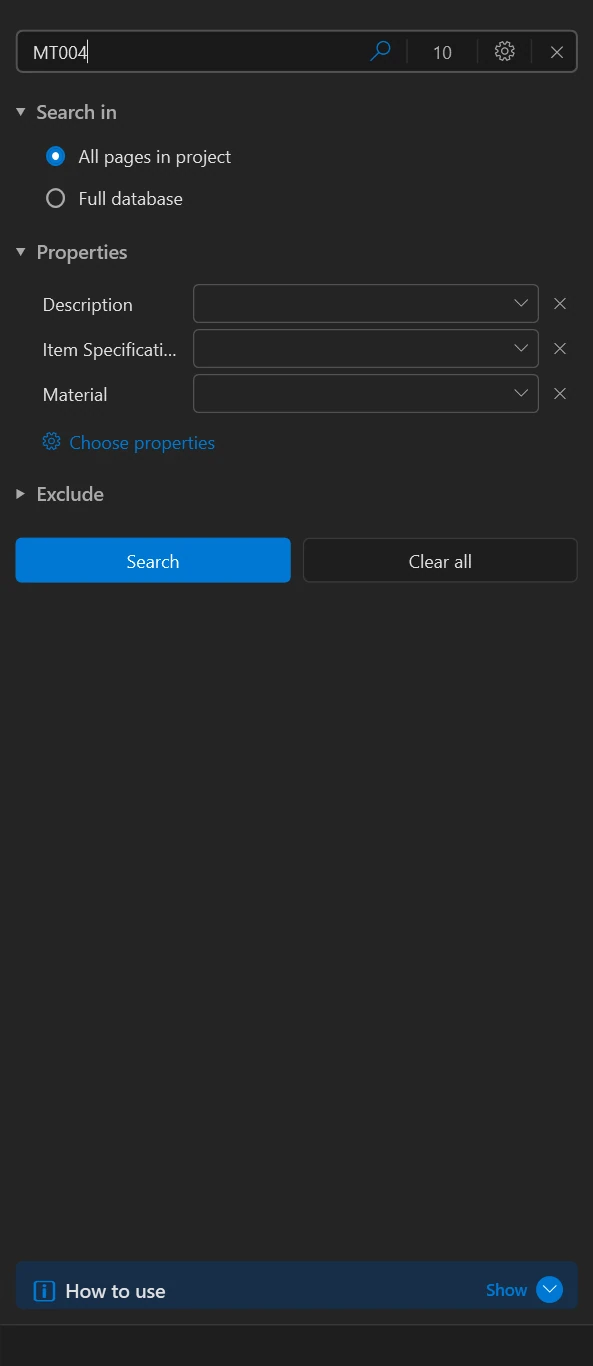
| Part | What it does |
|---|---|
| Search text | The same text as the search box at the top. With the magnifier, the count, the gear for search properties and the cross that clears the text. |
| Search in | All pages in project searches every page of the open project. Full database searches every project in the database. See Full Database Results. |
| Properties | One row per property. Pick a value or type a part of it. See Property Rows and Value Lists. |
| Exclude | Results that contain one of these words are removed. Separate words with spaces or commas. |
| Search | Shows the results. Only on when there is something new to show. |
| Clear all | Empties the text, every row and the exclude box, and sets Search in back to All pages in project. The page comes back. The pane stays open. |
| How to use | Click Show for a short explanation in the pane. |
To search with the pane:
- Type a text, or pick a value in a property row.
- Press Enter or click Search.
- To narrow the results, pick another value. The item boxes follow at once.
Good to know
- Once results are on screen, a choice updates them at once: a value picked from a list, a row cleared with its cross, or a new Search in. Typed text waits for Enter.
- When you clear the last thing of the search, the search ends.
- Exclude words look in the file name and in every property, not only in the search properties. Exclude words alone are not a search.
- The number next to the funnel in the search box counts the filled rows, plus 1 for exclude words.
- When you go back to a level with search results, its search comes back in the boxes.
- The Properties section is not there in the Standard edition.