Left Panel
The left panel holds four panes. Pick one with the icon strip on the far left of the window.
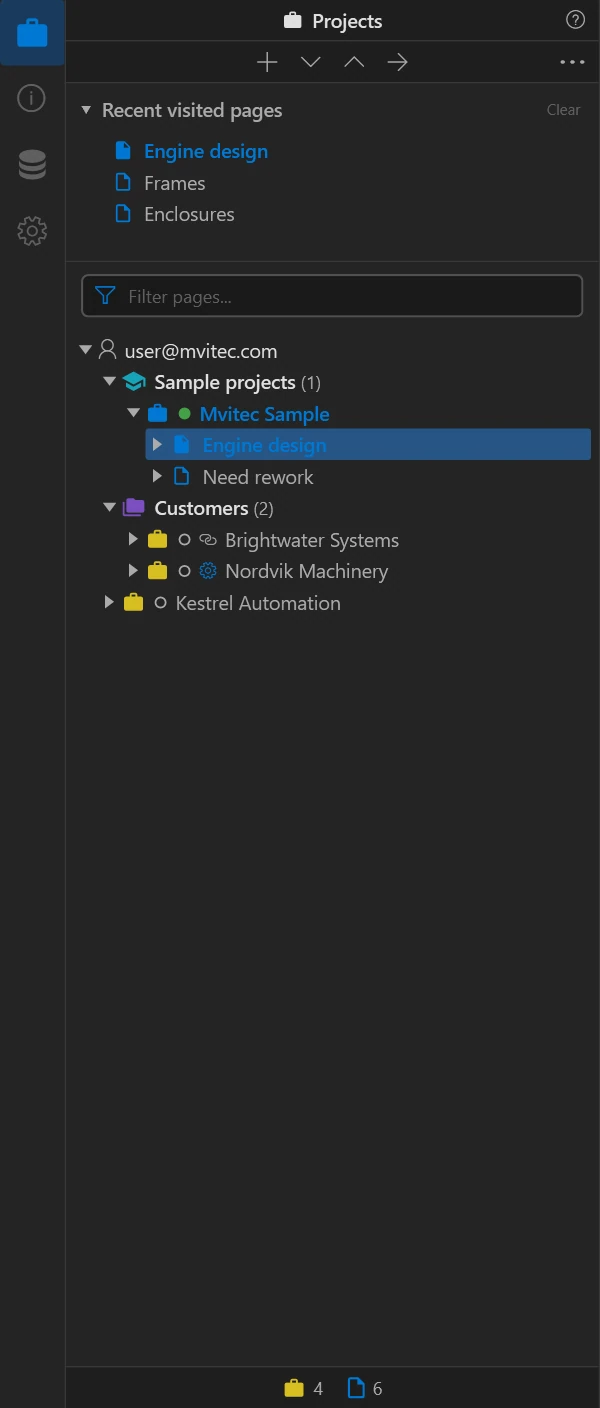
| Icon | Pane | What it is for |
|---|---|---|
| Briefcase | Projects | Your projects and their pages. Activate a page to see its item boxes. See Projects. |
| Info | Item Info | The card, the properties and the where used list of one file. See Item Info Pane. |
| Database | Database | What Vitreo keeps about your files, and the tools to refresh it. See Database Pane. |
| Gear | Settings | Options, date format, backup and restore, shared settings. See Settings. |
To open a pane:
- Click its icon in the strip. The name of the pane shows at the top of the panel.
Good to know
- Some tabs open a pane by themselves. Rename, Export and Compare show Item Info, so a click on a row shows that file.
- Home in the command bar brings the Projects pane back.
- Each pane keeps its own width. See Panes and Splitters.
- When the left panel is hidden, only the icon strip stays. Click an icon to open the panel again.