Project Menu
Right-click a project in the Projects pane to see every command for that project.
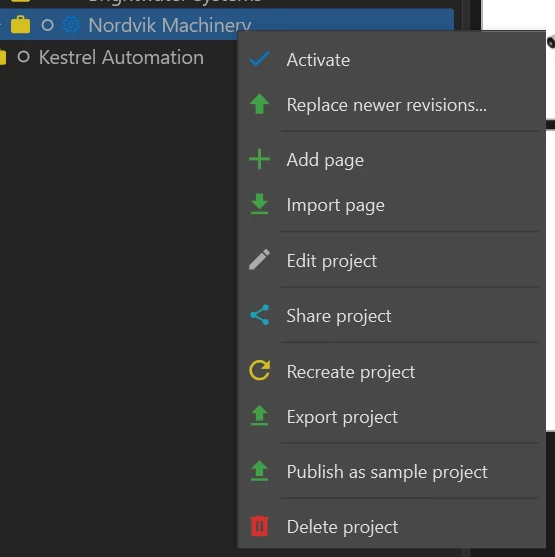
Commands
| Command | What it does |
|---|---|
| Activate | Makes this the active project and shows its last used page. Double-clicking the project does the same. |
| Replace newer revisions... | Lists the home items of all pages of this project that have a newer revision in their folder. See Newer Revisions. |
| Add page | Adds an empty page. See Pages. |
| Import page | Adds a page from a zip made with Export page. See Export and Import Projects. |
| Edit project | Name, SOLIDWORKS version, SOLIDWORKS templates, numbering system and group in one form. See Creating a Project. |
| Share project | Puts the project on the Mvitec server and gives you a share code. See Shared Projects. |
| Recreate project | Throws away what Vitreo stored about the folders of this project and reads all its files again. |
| Export project | Saves the project settings and all its files as one zip. |
| Reset sample project | Only on a sample project. Downloads the newest sample files and settings again. |
| Delete project | Removes the project with its pages and settings from Vitreo. |
A shared project shows Refresh shared project, Copy share code and Stop sharing (removes the share) or Leave shared project instead of Share project.
Recreate project
Use it when item boxes look wrong or out of date, for example after files could not be read during the first load. Vitreo asks first. Other projects and your SOLIDWORKS files are not touched. It can take a while. See Sync All, Recreate Project, Recreate Database.
Delete project
Vitreo asks first and shows how many pages go with it. The project, its pages, columns and settings are removed.
Note Your SOLIDWORKS files are never deleted. Only for the sample project, the downloaded sample files are removed too.
Good to know
- Activating a project reads its folders that are not read yet. Only new and changed files are read.
- After you delete the active project, Vitreo opens the last visited page of another project.