Numbering System
The numbering system is the rule for the file names of a project: a fixed part, a counter and a revision. Vitreo uses it to propose new file names and to find newer revisions.
To set the numbering system:
- Right-click the project and choose Edit project. Under Numbering system, click Set up or Change. Or right-click any item box and choose Numbering system settings.
- Type the fixed part of the name.
- Click the chips for the parts that change: Counter, Revision (letter) or Revision (counter).
- Check the large Sample: it shows the first file name of your rule.
- Click Save.
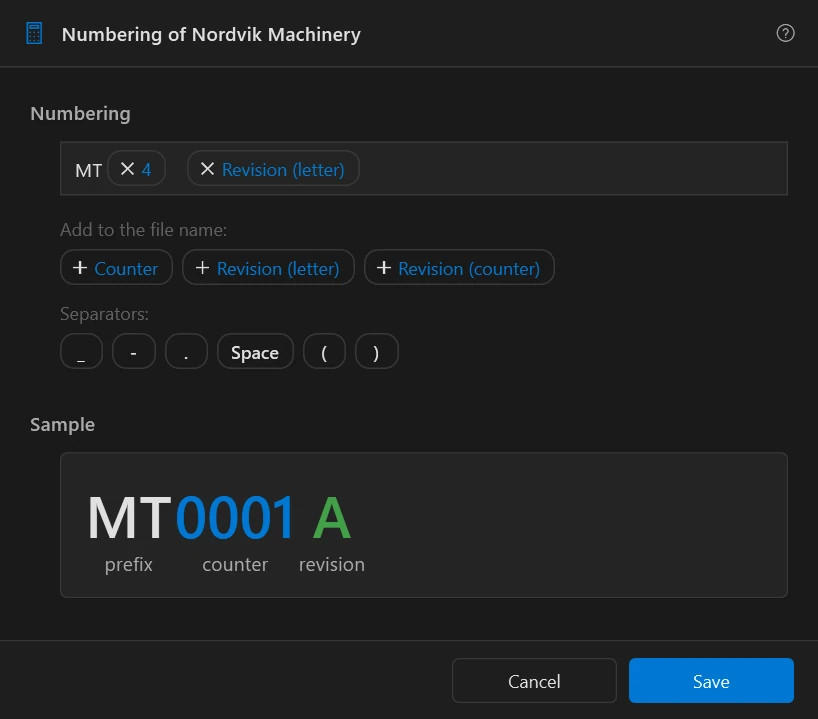
The chips
| Chip | Adds | What it does |
|---|---|---|
| Counter | {Counter:5} |
The number that goes up by one for every new file. The 5 is the number of digits: 00001. Change it to your own width. |
| Revision (letter) | {Revision:A} |
The revision as a letter: A, then B, then C. |
| Revision (counter) | {Revision:01} |
The revision as a number: 01, then 02, then 03. The 01 sets the number of digits. |
Examples
| Pattern | First file | Next revision | Next new file |
|---|---|---|---|
AB{Counter:4}{Revision:A} |
AB0001A | AB0001B | AB0002A |
{Counter:5}_{Revision:01} |
00001_01 | 00001_02 | 00002_01 |
P-{Counter:3} |
P-001 | none | P-002 |
What the parts do
- With a Counter, New SOLIDWORKS File proposes the next free name.
- With a Revision chip, Vitreo finds Newer Revisions and can Show All Revisions.
- Without a Revision chip, Vitreo does not check for newer revisions in this project.
Good to know
- Put a separator like
_or-before Revision (counter). Vitreo needs it to tell the revision from the counter. - A letter revision has at most two letters at the end of the name.
- The numbering is a project setting. In a group, it comes from the project that holds the group settings. See Project Groups.
- The numbering never renames files. It only reads names and proposes new ones.