Project Groups
A group puts projects under one row in the Projects pane. A group is one company: the projects in it can use the settings of one project, so every project works with the same columns, templates and numbering.
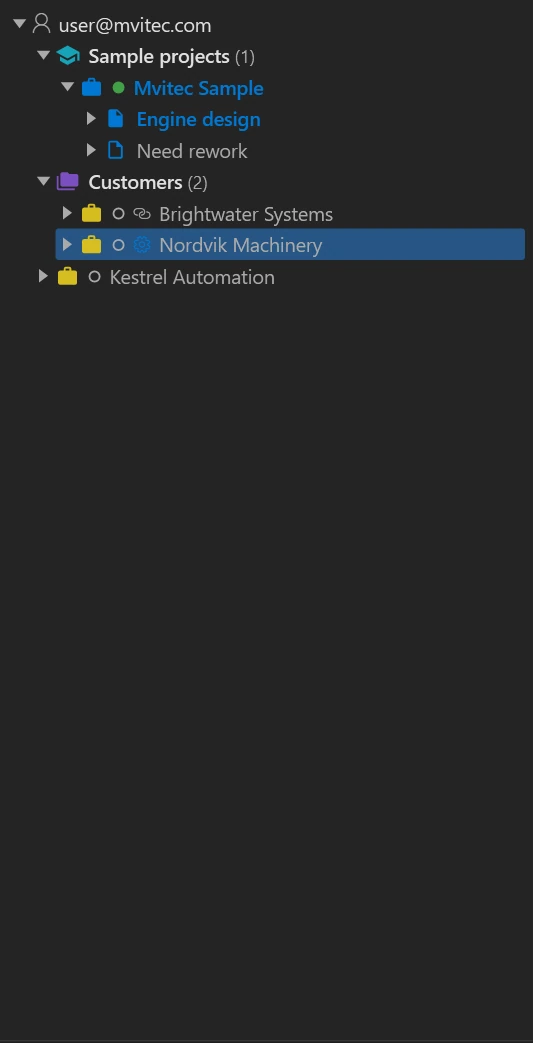
To put a project in a group:
- Drag the project onto a group row, or onto a project in that group.
- Or right-click the project, choose Edit project and pick or type a Group.
To take a project out of its group:
- Drag it onto the top row of the tree (your email address), or onto a project that is not in a group.
Settings for all projects
One project of the group can hold the settings of the whole group: columns, BOM and export templates, rename rules, search setup, numbering, SOLIDWORKS version and templates. Pages and home items stay per project.
Group: Company A
- Machines holds the settings
- Line 1
- Line 2
- Spare partsuses the settings of Machines
- Catalog
→
One set of settings
- Columns
- BOM and export templates
- Rename rules
- Search setup
- Numbering
- SOLIDWORKS version and templates
To choose the project that holds the settings:
- Right-click the group and choose Settings for all projects.
- Click the project. The group keeps the settings it has. They move to that project.
Choose Each project its own settings to give every project its own settings back.
| Icon after the name | It means |
|---|---|
| Gear | This project holds the settings of its group. |
| Link | This project uses the settings of another project. Hover it to see which one. |
Group menu
| Command | What it does |
|---|---|
| Settings for all projects | Picks the project whose settings the group uses. |
| Rename group | Gives the group a new name. The projects stay the same. |
| Remove group (keeps the projects) | Removes only the group row. The projects move back to the top level and use their own settings again. |
Good to know
- The project that starts a new group holds its settings. A new project that joins the group uses them.
- A project that leaves the group gets its own old settings back.
- Groups and projects are sorted A to Z.
- The sample project and shared projects cannot be dragged into a group.