Field Mapping
With field mapping you make a list of fields. Each field has the name your ERP system expects and the Vitreo value that goes in it. Vitreo writes the file itself.
To set up field mapping:
- In the ERP Tools pane, under File, click Field mapping. Vitreo builds the file.
- Under Format, click CSV, Excel, XML or JSON.
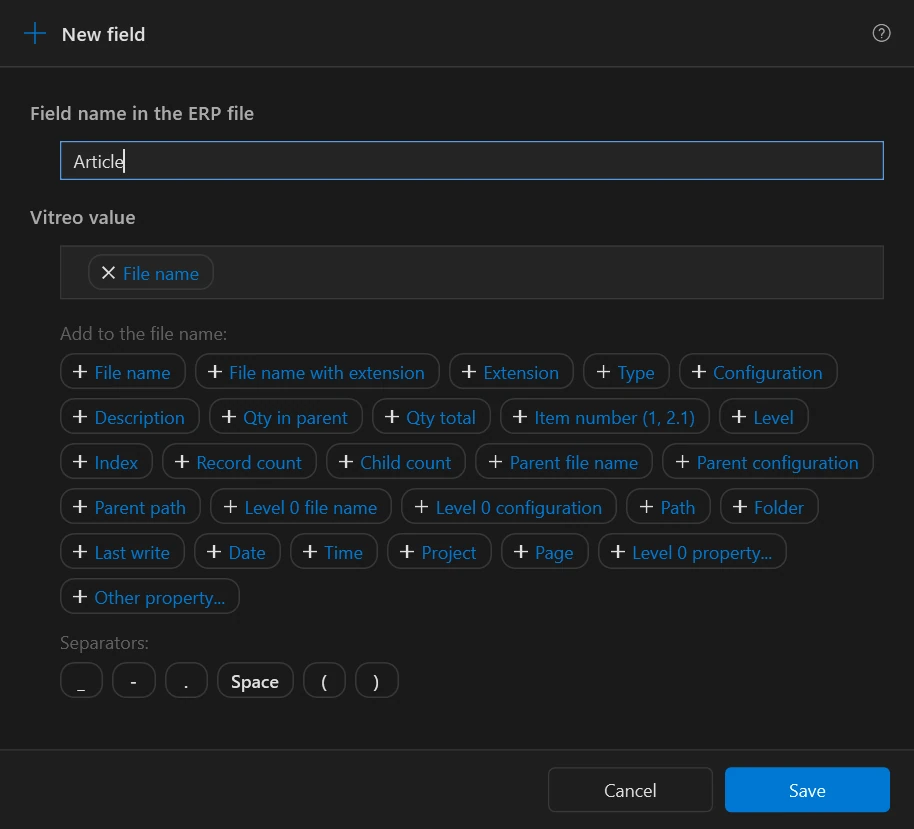
- In the ERP design, right-click and choose Add field. Or click the + button in the header.
- In Field name in the ERP file, type the name your ERP system expects, for example ItemNumber.
- Under Vitreo value, click a token, for example File name. You can add text and separators around it.
- Click Save.
The field name
| Format | The field name becomes |
|---|---|
| CSV, Excel | The column header |
| XML | The element name |
| JSON | The property name |
The order of the fields is the order of the columns or elements in the file.
The value
The value is text with tokens. A token is replaced by data of each record, for example {QtyTotal} by the total quantity. Typed text stays as it is, so a fixed value like EA is allowed. Other property... adds a property of the item. Level 0 property... adds a property of the level 0 item. See ERP Tokens for every token.
Field commands
Right-click a field in the ERP design:
| Command | What it does |
|---|---|
| Add field | Adds a new field after this one. |
| Edit field | Opens the field. Double-click or Enter does the same. |
| Duplicate | Adds a copy named with a 2 behind it. |
| Move up / Move down | Changes the order of the fields. |
| Remove field | Removes the field. Delete does the same. |
Important Remove field does not ask first and cannot be undone. Use Export under Template to keep a copy of a finished template.
Good to know
- A field shown in red holds a token Vitreo does not know. Double-click it to fix it.
- Hover a field to see its value and the value of the first record.
- Two fields cannot have the same name.
- XML and JSON names for the list, the record and the children are set under Options. See File Name, Location and Options.
- XML and JSON files also get the export date and time, as exported.