Help Menu
The Help menu takes you to these help pages, the release notes and Mvitec support. Click Help (the blue question mark) on the right of the command bar.
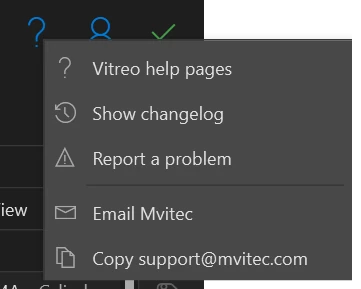
| Menu item | What it does |
|---|---|
| Vitreo help pages | Opens the start page of these help pages in your browser. |
| Show changelog | Opens the version history and release notes of Vitreo on mvitec.com. |
| Report a problem | Opens a support ticket on mvitec.com. Your Vitreo version and the active project and page are filled in. |
| Email Mvitec | Opens a new email to support@mvitec.com in your mail program. The subject holds your Vitreo version. The body holds your edition, account and the active project and page. |
| Copy support@mvitec.com | Copies the address to the clipboard. Paste it in any mail program. |
Good to know
- Every pane, most center toolbars and most dialog boxes have a small question mark on the right of their title bar. Click it to open the help page about that part of Vitreo.
- The web pages sign you in on mvitec.com with your Vitreo account. You do not type your password again.
- The web pages need an internet connection. Without it, Vitreo shows a warning with the web address.
- The wrong mail program opens? Use Copy support@mvitec.com and paste the address in the mail program you want.
- No mail program at all? Vitreo puts the address on the clipboard and tells you so.
For what to send with a problem, see Getting Help.