Item Box Menu
Right-click an item box to open its menu. When item boxes are checked, most commands act on all checked item boxes and show how many, for example Open 3 items in SOLIDWORKS (see Checking Item Boxes). Rename is explained in Copy and Rename, Add to File Explorer... in Adding Items to the File Explorer, Show all revisions in Show All Revisions and Numbering system settings in Numbering System.
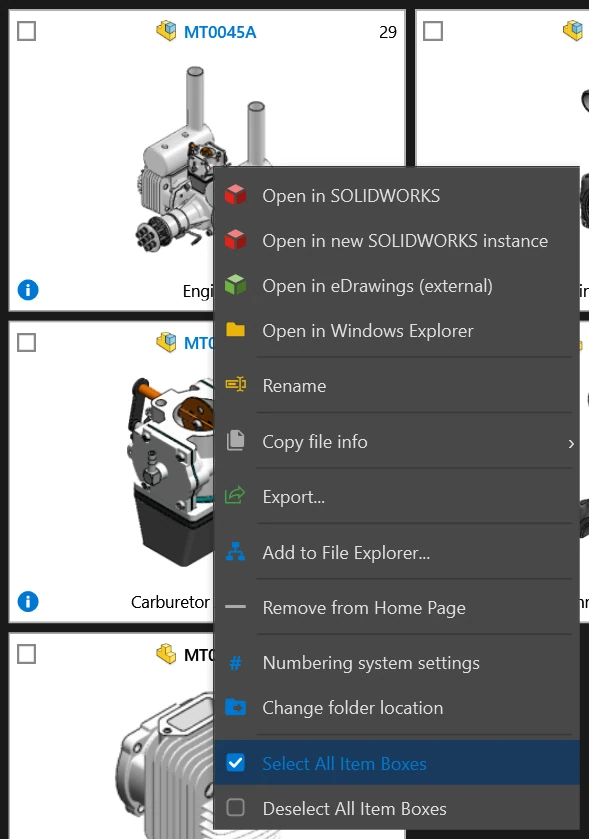
| Open Commands | Open in SOLIDWORKS, in a new instance, in eDrawings, in Windows Explorer. |
| Create or Open Drawing | Make a drawing from the project template or open the existing one. |
| Copy File Info | Paths, names and the picture to the clipboard. |
| Quick Export | Export one file to PDF, STEP, DXF and more without a template. |
| Compare These 2 Items | Start a compare from two item boxes. |
| Home Page and Publish Page | Add to or remove from a page. |
| Change Folder Location | Point a moved item to its new folder. |
| Delete File from Directory | Optional. Sends the file to the Recycle Bin. |